What is a VPN (Virtual Private Network)?
A Virtual Private Network (VPN) provides privacy and anonymity online as it provides the user with a private network even when they are using a public internet connection. The VPN provides the online user with a screen making the online actions and activities private.
The VPN also provides a securely encrypted connection that provides additional privacy as it prevents others from intercepting the activity, including from individuals who are attempting to steal personal information in order to access bank account details, login details or carry out identity theft.
Why Would a User Want or Need a VPN?
When a user is browsing the Internet, accessing private online accounts, such as bank accounts, social media, emails, shopping sites etc, if they are using a Virtual Private Network then no other parties can access or intercept that information.
A VPN Prevents Data Interception
The VPN provides the user with encryption to prevent any other users from being able to read or eavesdrop on the data being accessed as the data is encrypted from the computer over the WiFi network.
This means that the data and activity can be intercepted but it cannot be read as it is encrypted. This is particularly important when using a device within a public environment or network as it stops others within that network from viewing your activity.
The VPN Prevents User Identification
VPN basically provides a tunnel from the local network to the exit node in another location, effectively making it appear that the computer is being accessed from another location via another IP address.
The IP address being used to browse the Internet is provided by the VPN from their server, rather than the actual IP address of the user, meaning that the IP address cannot be used to trace the individual, rather to the server provided by the VPN.
A VPN Prevents the Service Provider from Monitoring Internet Activity
The VPN also prevents the Internet service provider from being able to record, retain or review any Internet activity that has taken place on that device through their service.
VPN Providers
There are many VPN providers that offer the software free, these include Tor which includes an Internet browsing software that automatically removes any browsing history and activity.
Other free providers include Hotspot Shield, Proton VPN and Speedify.
How To Manually Configure a VPN in Windows 10
The majority of VPN’s provide their own software that will allow the use of the service through the app, however, there are occasions where a user would want to manually configure the VPN themselves. Here we use Windows 10 as an example of how to configure a VPN connection.
Once you have subscribed to a VPN provider, it should be possible to obtain a user name and password required to access the server as well as a list of servers that the provider provides connection to, including the details required to manually connect to those servers.
Once the details are known, the VPN connection can be manually added by:
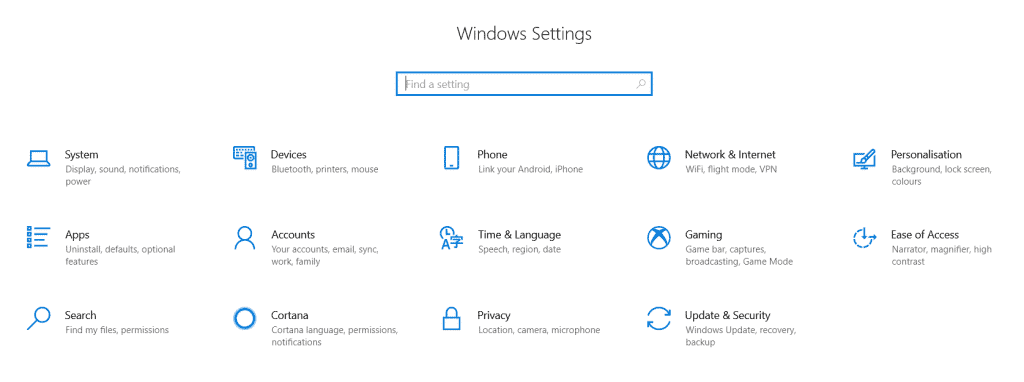
Left click the Start button at the bottom left side of the main screen and select the ‘PC Settings’ option as below

Within the PC Settings menu select ‘Network and Internet’
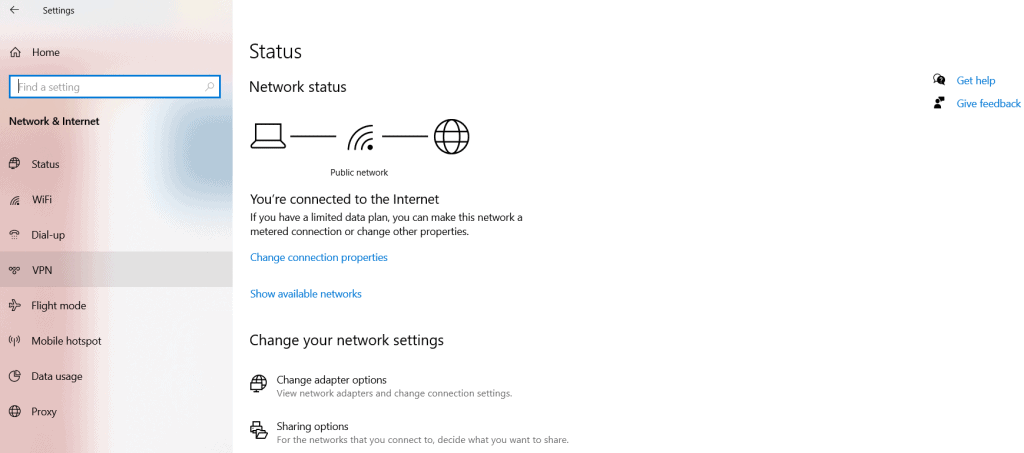
Then select the ‘VPN’ option within the ‘Network and Internet’ menu as below
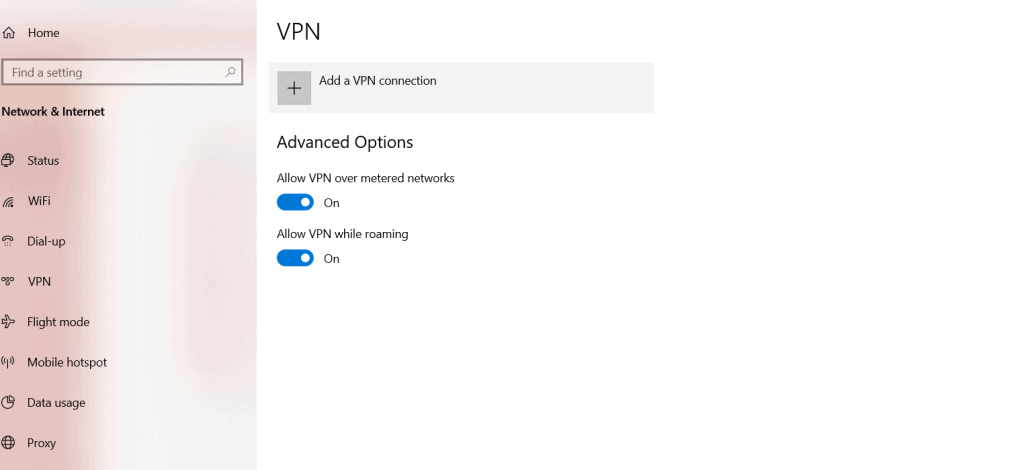
Then select the ‘Add a VPN’ option
Click the ‘VPN Provider’ option at the top of the list and select ‘Windows (built-in)’ as below
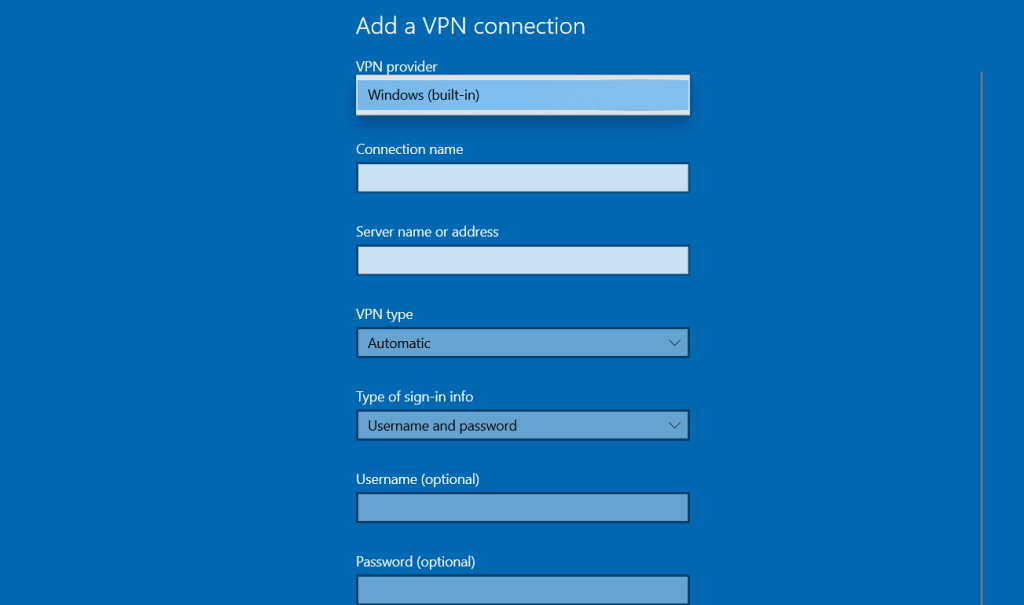
Then select the ‘Connection Name’ window and enter a name for the connection, normally it would be the name of the provider, but it can be anything.
Then select the ‘Server name or address’ option and enter the server details obtained from the VPN provider.
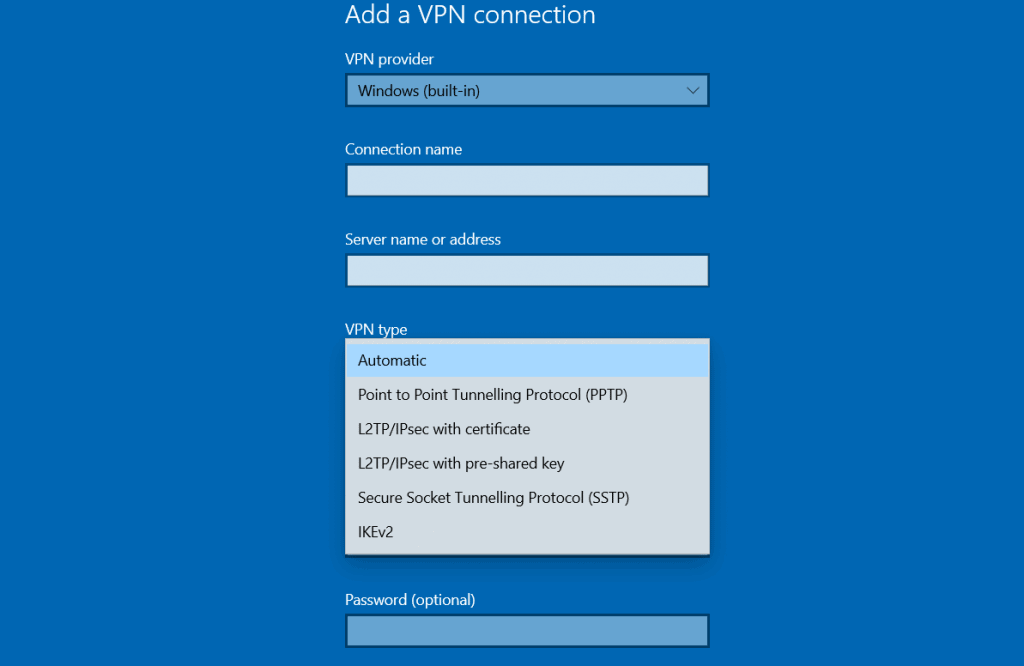
Select the ‘VPN type’ and select the protocol from the dropdown, this information may also be available from the provider.
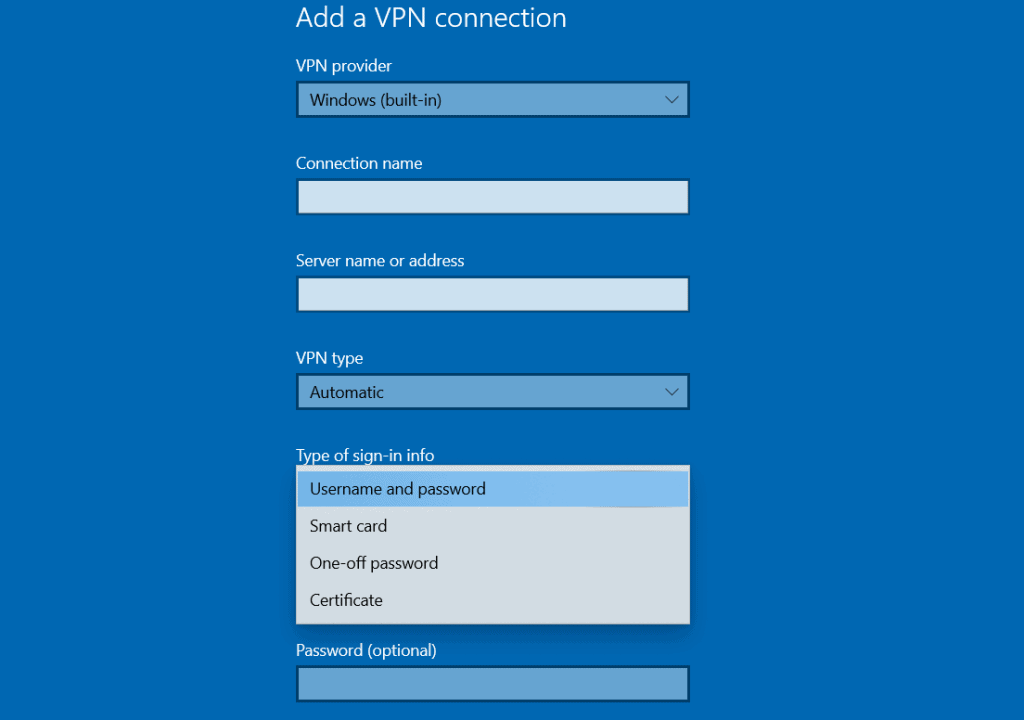
Select the ‘Type of sign-in info’ drop down menu and select the login type, this will depend upon how the provider identifies the user, it may be a user name and password but it will be information that is available from the provider’s user account area.
Then select ‘Save’ at the bottom of the window.
The configured VPN connection will appear within the VPN list on the ‘VPN’ settings page.
Select that connection and select ‘Connect’.
The manually configured connection should now be active.
VPN Protocols
There are 4 types of VPN protocols and these are summarised below:
Point-to-Point Tunneling Protocol – PPTP
PPTP is a VPN based protocol and an extension of the Internet’s Point-to-Point Protocol (PPP). Point-to-Point Tunneling Protocol allows an employee to use any service provider to connect to a server in another location of the company.
Point-to-Point Tunneling can be setup easily, however, it uses weak encryption.
Layer 2 Tunneling Protocol – L2TP
Layer 2 Tunneling originates from 2 tunneling protocols, being Layer 2 Forwarding Protocol and Point-to-Point Tunneling Protocol.
L2TP provides additional security features and is the industry standard for secure VPN tunnels.
Secure Sockets Tunneling Protocol (SSTP)
Similarly to Point-to-Point Tunneling Protocol (PTPP), Secure Sockets Tunneling Protocol transports Point-to-Point Protocol traffic, however, it uses an SSL/TLS connection and offers more security than PPTP and it uses the HTTPS protocol over port 443 so that it can pass through firewalls when PTPP or L2TP may not be able to.
Internet Key Exchange Version 2 (IKEv2)
Internet Key Exchange is based upon ISAKMP and uses X.509 Public Key certificates for authentication.
The protocol enables the VPN tunnel to be maintained even when the user moves mobile phone cell or the connection is broken. This protocol does not need to provide authentication through a certificate or shared key.
About Athena Forensics
For information on our digital forensic services or if you require any advice or assistance please contact a member of our team on 0330 123 4448 or via email on enquiries@athenaforensics.co.uk, further details are available on our contact us page.
Our client’s confidentiality is of the utmost importance. All correspondence is treated with discretion, from initial contact to the conclusion of any computer forensic investigation.
Our digital forensics experts are fully aware of the significance and importance of the information that they encounter and we have been accredited to ISO 9001 for 10 years.
Our forensic experts are all security cleared and we offer non-disclosure agreements if required. Our premises along with our security procedures have been inspected and approved by law enforcement agencies.
Athena Forensics do not disclose personal information to other companies or suppliers.
https://athenaforensics.co.uk/service/mobile-phone-forensic-experts/
https://athenaforensics.co.uk/service/computer-forensic-experts/





